3
History
Pavel Baksy edited this page 2026-05-18 17:39:51 +02:00
History
Every request you send is automatically saved to history and persists across sessions.
Accessing History
History appears in the bottom panel of the main window. Each entry shows method, URL, status code, timestamp, and response time, sorted newest first.
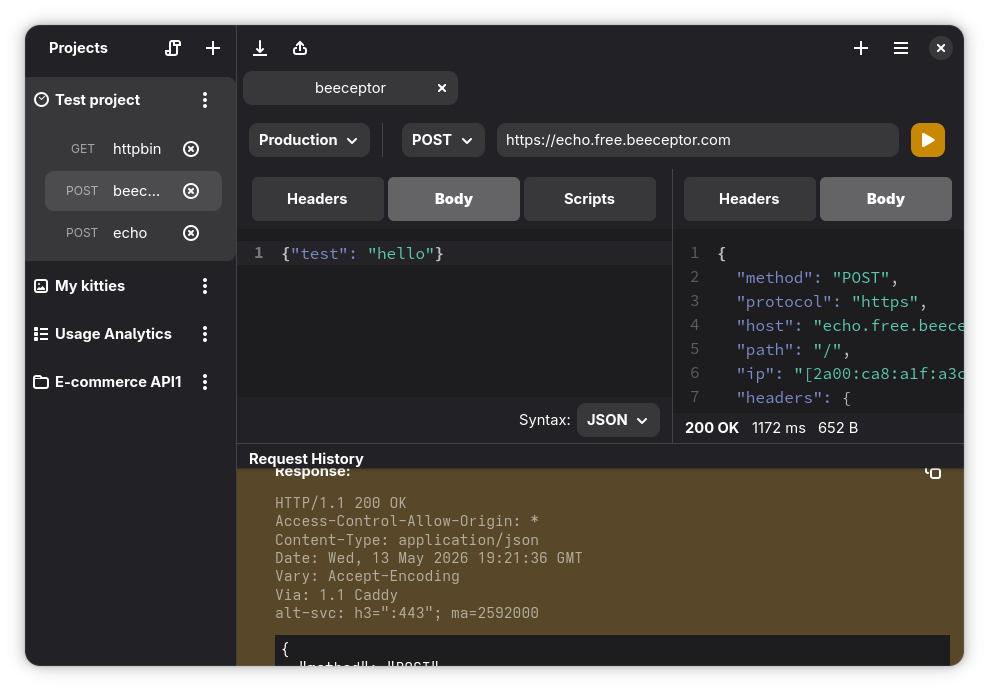
Click any entry to open it in a new tab — you can modify and resend it.
Storage
- Native:
~/.local/share/cz.bugsy.roster/history.json - Flatpak:
~/.var/app/cz.bugsy.roster/data/cz.bugsy.roster/history.json
Clearing History
No built-in UI — delete history.json and restart the app.
Privacy
History contains full request and response data in plaintext, including headers and bodies. Clear it periodically if requests contain sensitive data.