3
Import
Pavel Baksy edited this page 2026-05-19 14:53:49 +02:00
Import
Roster can import API definitions from OpenAPI/Swagger and WSDL endpoints, automatically creating saved requests for all discovered operations.
Supported Formats
OpenAPI / Swagger
- OpenAPI 2.0 (Swagger) — JSON or YAML
- OpenAPI 3.x — JSON or YAML
Imports all defined API operations as separate saved requests, including:
- HTTP method and path
- Base URL from
host/serversfield - Request headers (
Content-Type,Accept) - JSON body template generated from the request schema
WSDL (Web Services Description Language)
- WSDL 1.1
- WSDL 2.0
Imports all defined operations as SOAP requests, including:
- Endpoint URL from the WSDL binding
Content-Type: text/xmlheader- XML body template generated from the input message schema, with correct namespace prefixes for each element — including WCF services that use DataContract types defined in a separate namespace
How to Import
OpenAPI / Swagger
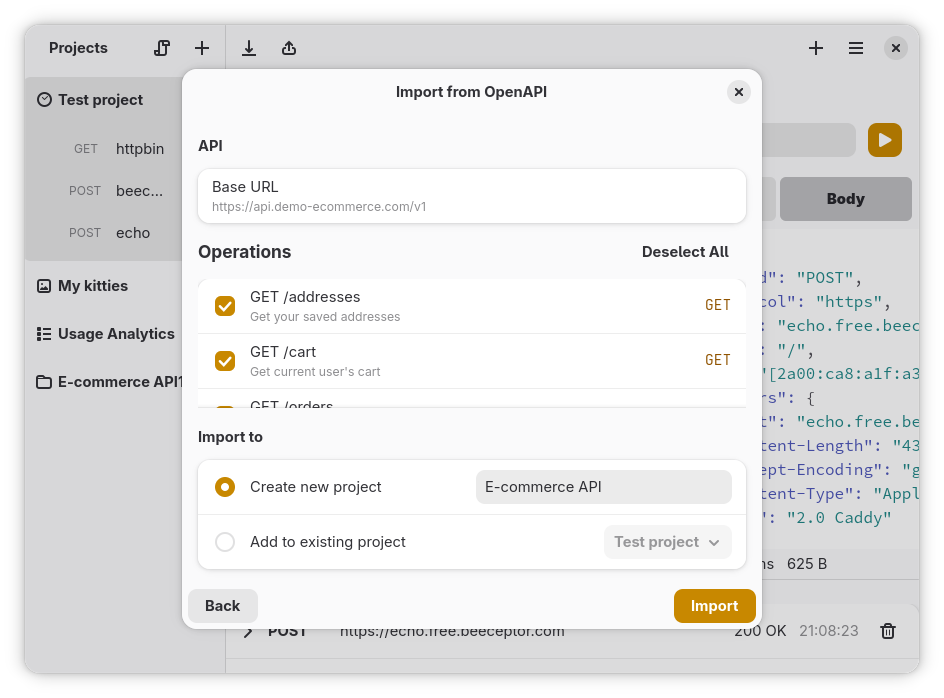
- Click the Import button (papyrus icon) in the sidebar toolbar
- Select "Import from OpenAPI / Swagger"
- Enter the Spec URL of the OpenAPI/Swagger definition (must start with
http://orhttps://) - Click Fetch — Roster downloads and parses the spec
- Select the operations you want to import (or select all)
- Choose or create a project to import into
- Click "Import"
WSDL
- Click the Import button (papyrus icon) in the sidebar toolbar
- Select "Import from WSDL"
- Enter the WSDL URL of the service description (WSDL 1.1 or 2.0)
- Click Fetch WSDL — Roster downloads and parses the service description
- Select the operations you want to import (or select all)
- Choose or create a project to import into
- Click "Import"
The imported requests are saved to the selected project and ready to send.
Tips
- Imported requests use placeholder values from the schema (e.g., empty strings for required fields). Fill in actual values before sending.
- Variable substitution works in imported requests — add
{{variable_name}}to the URL or body after importing. - For OpenAPI imports with
{{server}}or similar base URL variables, set up an environment with the actual server URL.
Next Steps
- Projects-and-Environments - Organize imported requests into projects
- Variables - Add environment variables to imported requests
- Getting-Started - Learn how to send requests